
Business License & Certificate Tracking: How to Prevent Missed Renewals
Business licenses, insurance certificates, permits, registrations, DBAs, inspection records, and professional credentials can become difficult to manage when they are scattered across email, folders, and cloud drives. A centralized license and certificate tracking system helps businesses see what is current, what is expiring soon, and what already requires attention.
Business License & Certificate Tracking: How to Prevent Missed Renewals
Running a business often means managing far more documents than owners expect.
A single company may need to maintain business licenses, professional credentials, permits, insurance certificates, registrations, DBAs, inspection records, occupancy documents, local approvals, and other certificates depending on where and how it operates.
The problem is rarely just obtaining these documents.
The real operational challenge is keeping them organized, knowing which version is current, remembering when each one expires, and being able to produce proof quickly when someone asks for it.
That is why business license tracking should be treated as an ongoing business process rather than an occasional administrative task.
A strong system gives the business one place to answer three important questions:
1. What credentials are currently valid?
2. What is approaching expiration?
3. What has already expired or requires immediate attention?
For small businesses, multi-location operators, independent professionals, contractors, agencies, landlords, consultants, and other organizations, that visibility can help prevent avoidable disruption.
Why Business Licenses and Certificates Become Difficult to Manage
Business compliance documents rarely arrive through one system.
A local license may be downloaded from a city portal.
An insurance certificate may arrive by email from a broker.
A professional credential may be issued through a state licensing board.
A permit may exist as a PDF saved on one employee's computer.
A DBA registration may be stored in a cloud folder created years ago.
An inspection record may only exist in an inbox attachment.
Over time, important credentials become scattered across:
- email inboxes,
- desktop folders,
- shared drives,
- cloud storage,
- filing cabinets,
- employee computers,
- accounting folders,
- insurance portals,
- regulatory websites,
- and physical paperwork.
The business may still possess the documents, but finding them quickly becomes difficult.
Expiration dates create an even greater problem.
A document can remain safely stored in a folder while quietly becoming invalid.
That is why document storage by itself is not enough.
Businesses need both storage and expiration management.
What Is Business License Tracking?
Business license tracking is the process of maintaining an organized record of required licenses, certificates, permits, registrations, credentials, and their associated renewal dates.
A useful tracking system should allow a business to record information such as:
- document name,
- document category,
- issuing authority,
- business entity or location,
- issue date,
- expiration date,
- renewal deadline,
- document status,
- responsible owner,
- notes,
- and the supporting document itself.
Instead of treating each certificate as an isolated file, the business creates a structured record around it.
That structure makes it possible to identify upcoming deadlines before they become emergencies.
The Documents Businesses Commonly Need to Track
The exact requirements vary by business type, industry, location, and jurisdiction, but many organizations manage several recurring document categories.
Business Licenses
These may include state, county, municipal, industry-specific, or activity-specific licenses.
Some businesses maintain multiple licenses at the same time, especially when operating in multiple jurisdictions.
Permits
Permits may relate to construction, occupancy, signage, health activities, food service, environmental requirements, special events, transportation, or other regulated activities.
Many permits have specific validity periods or renewal processes.
Insurance Certificates
Businesses are frequently asked to provide proof of insurance to clients, landlords, vendors, lenders, contractors, or other counterparties.
Certificates may include evidence of general liability, workers' compensation, professional liability, commercial auto, cyber coverage, or other policies.
Keeping current certificates easy to retrieve can reduce delays when a customer or business partner asks for proof.
Registrations
Registrations may include state registrations, local registrations, tax-related registrations, professional registrations, vendor registrations, or industry-specific records.
DBAs and Trade Names
Businesses operating under assumed names may need to maintain DBA or trade-name registrations and monitor applicable renewal requirements.
Professional Licenses and Credentials
Professionals may need to track licenses, certifications, continuing education requirements, or credentials connected to their work.
For a company employing multiple credentialed professionals, this can become a significant administrative task.
Inspection Records
Inspection records can help demonstrate that required reviews or inspections occurred.
Depending on the business, these may relate to facilities, health and safety, equipment, fire systems, occupancy, environmental requirements, or other operational areas.
Certificates and Other Compliance Records
Businesses may also maintain certificates issued by agencies, professional organizations, insurers, testing organizations, customers, vendors, or industry groups.
The important point is not that every business needs every category.
The important point is that the business should know exactly which documents apply to it and where each one is located.
The Biggest Risk: Expiration Happens Quietly
A missing document usually creates an obvious problem.
An expired document can be more dangerous because the file still exists.
Someone may open the folder, see a certificate, and assume everything is current.
Meanwhile, the expiration date may have passed weeks earlier.
This is why expiration management is one of the most important features of a business credential system.
A practical dashboard should make document status immediately visible.
For example:
- Current — no immediate action required.
- Expiring Soon — renewal planning should begin.
- Expired — immediate attention may be required.
That simple status model helps turn a folder full of documents into an operational management system.
Why Renewal Reminders Matter
Businesses frequently rely on memory, calendar entries, email reminders, or the issuing organization to tell them when something needs renewal.
That approach creates unnecessary risk.
Emails can be overlooked.
Employees can leave the company.
Calendar entries can disappear.
Renewal notices may be sent to an outdated address.
Responsibility may shift from one person to another without the deadline moving with it.
A dedicated expiration tracker creates an additional layer of control.
Rather than waiting until the renewal date arrives, businesses can receive reminders in advance.
For example, a system might flag a general liability certificate as expiring in 30 days and continue escalating the urgency as the deadline approaches.
The objective is not merely to remember the date.
The objective is to create enough lead time to complete the renewal process before the credential becomes invalid.
The Business Impact of an Expired Credential
The consequences of expiration depend on the document involved.
In some situations, the impact may simply be administrative inconvenience.
In others, an expired license, permit, insurance certificate, or professional credential may create operational problems.
Potential consequences can include:
- delayed customer onboarding,
- inability to provide required proof,
- interruptions with vendors or landlords,
- contract delays,
- postponed work,
- additional administrative costs,
- missed business opportunities,
- or the need for urgent renewal activity.
Requirements vary, so businesses should confirm their actual obligations with the appropriate issuing authority or qualified professional.
But from an operational perspective, preventing avoidable expiration is almost always easier than responding after the deadline has been missed.
Why Centralized Document Storage Helps
Expiration tracking becomes much more valuable when it is connected directly to the supporting document.
Imagine a customer asks for your current certificate of insurance.
Without a centralized system, someone may need to search email, contact the insurance broker, check a cloud folder, or ask another employee where the latest file is stored.
With a centralized business document wallet, the business can locate the credential and its current status from the same place.
This is particularly useful when documents are requested by:
- customers,
- vendors,
- insurers,
- brokers,
- landlords,
- lenders,
- contractors,
- auditors,
- professional organizations,
- or government agencies.
The value is not just storage.
It is retrieval speed plus confidence that the document is current.
Multi-Location Businesses Need an Additional Layer of Control
Managing one business location can already require several licenses and certificates.
Add multiple locations and the complexity increases quickly.
A company with five locations may have different:
- local licenses,
- occupancy documents,
- inspections,
- permits,
- insurance records,
- renewal dates,
- and responsible managers.
A simple shared folder does not always make it obvious which credential belongs to which location.
A stronger system associates each record with the correct business entity or location.
That allows an owner or compliance manager to answer questions such as:
- Which locations have fully current documents?
- Which location has a permit expiring next month?
- Is any certificate already expired?
- Which manager is responsible for the renewal?
- Where is the latest approved document?
This becomes especially useful as a business grows.
A Simple Business License Tracking Workflow
A business does not need an overly complicated compliance program to improve document control.
A practical workflow can be built around a few repeatable steps.
Step 1: Identify Every Important Credential
Create an inventory of licenses, permits, insurance certificates, registrations, DBAs, professional credentials, inspection records, and other documents the business wants to manage.
Do not rely on memory alone.
Review existing folders, emails, cloud drives, accounting records, insurance documents, and business registrations.
Step 2: Record the Important Details
For each item, capture the information needed to understand and manage it.
At minimum, consider recording:
- document name,
- category,
- issuing organization,
- business or location,
- issue date,
- expiration date,
- responsible owner,
- and document status.
Step 3: Store the Current Document
Attach or securely store the actual credential so the business does not need to search a second system every time proof is requested.
Step 4: Track Expiration Dates
Make expiration dates visible rather than burying them inside the document.
A dashboard or status view should make it obvious which documents are current, approaching expiration, or expired.
Step 5: Send Renewal Reminders
Create reminders early enough to allow the responsible person to complete the renewal process.
The appropriate lead time depends on the credential.
Some renewals may be straightforward, while others may require inspections, updated documents, fees, applications, professional review, or third-party action.
Step 6: Replace Old Versions
When a document is renewed, update the active record with the new expiration date and current supporting file.
Do not allow outdated versions to create confusion about what is currently valid.
Step 7: Review the Wallet Regularly
Even automated reminders should be supported by periodic review.
A quick monthly review can help identify unusual situations, incomplete records, missing documents, or renewals that are not progressing as expected.
The Difference Between a Cloud Folder and a Compliance Wallet
Cloud storage is useful, but storage and management are not the same thing.
A cloud folder may tell you that a PDF exists.
A compliance wallet should tell you:
- what the document is,
- who it belongs to,
- whether it is current,
- when it expires,
- whether action is required,
- and where the current file is located.
That distinction matters.
A folder is primarily designed to hold files.
A credential-management system is designed to help the business act on those files.
Security and Private Access Matter
Business licenses and certificates may contain information that a company does not want publicly accessible.
Some records can include identifying details, policy information, addresses, registration numbers, or other sensitive business information.
A document wallet should therefore use appropriate access controls and private viewing rather than exposing files through unrestricted public links.
Businesses should also consider who actually needs access.
The owner may need everything.
A location manager may only need documents for one location.
An employee may only need to view a specific certificate.
As the system grows, permission management becomes increasingly important.
Common Business License Tracking Mistakes
Keeping Everything in Email
Email is useful for receiving documents, but poor as a long-term compliance database.
Once the message disappears into thousands of other emails, retrieval becomes difficult.
Tracking Dates Without Storing the Document
A spreadsheet may show that a license expires next month but still force someone to search elsewhere for the actual license.
Tracking and document storage are more useful when connected.
Storing Documents Without Tracking Dates
This creates the opposite problem.
The business has every PDF but no reliable view of what is about to expire.
Relying on One Employee's Memory
Critical renewal knowledge should survive staffing changes, vacations, and changing responsibilities.
Waiting Until the Final Week
Some renewals cannot be completed instantly.
Earlier reminders create time to resolve missing paperwork, payment issues, inspections, or other dependencies.
Mixing Multiple Locations Together
Multi-location businesses should clearly associate credentials with the correct location or entity.
Keeping Expired Documents Mixed With Current Ones
Historical records may be useful, but users should be able to immediately distinguish archived documents from the active version.
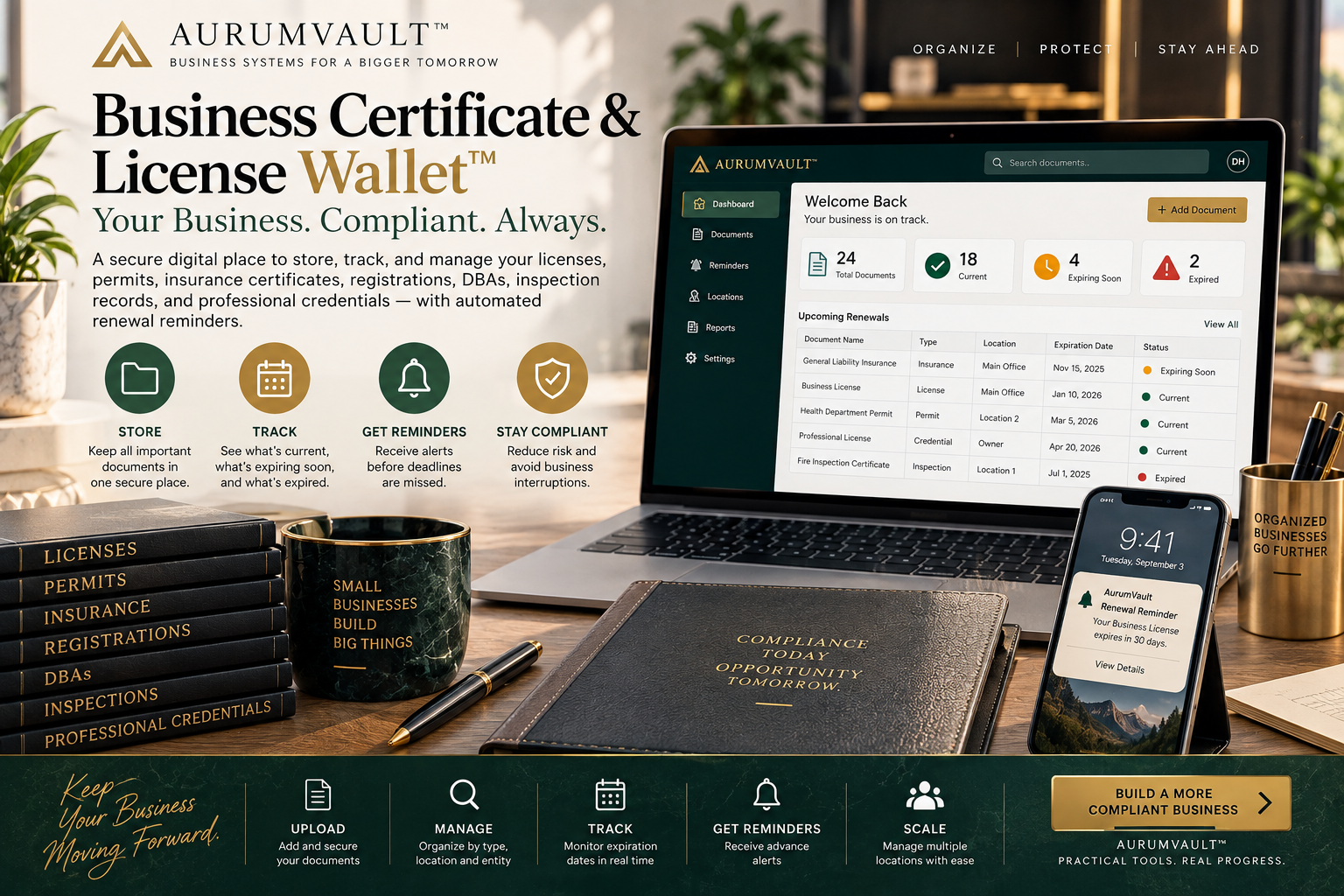
Introducing the Business Certificate & License Wallet™
The Business Certificate & License Wallet™ from AurumVault is designed around this practical problem.
It provides businesses with a secure digital place to organize and track important credentials such as:
- business licenses,
- permits,
- insurance certificates,
- registrations,
- DBAs,
- professional licenses,
- certificates,
- and inspection records.
Its central advantage is expiration management.
Instead of leaving documents scattered across email, folders, and cloud drives, the Wallet is designed to show what is current, what is expiring soon, and what has already expired.
Renewal reminders help surface upcoming deadlines before they are missed.
For businesses operating across multiple locations, the same approach can help keep credentials organized by location rather than mixing everything into one document repository.
The concept can be summarized in one sentence:
It is a recurring business compliance wallet that stores critical credentials, tracks expiration dates, and reminds you before something important expires.
Who Could Benefit From a Business Certificate & License Wallet?
The concept can be useful anywhere a business repeatedly manages time-sensitive credentials.
Examples may include:
- small businesses,
- professional service companies,
- contractors,
- agencies,
- consultants,
- property-related businesses,
- multi-location businesses,
- private practices,
- ecommerce businesses,
- vendors serving larger organizations,
- and companies that frequently need to provide proof of insurance or credentials.
The value generally increases as the number of documents, locations, employees, or renewal dates increases.
A Better Way to Think About Compliance Documents
Most businesses do not need more files.
They need better visibility into the files they already have.
A modern credential-management process should answer:
What do we have?
Where is it?
Is it current?
When does it expire?
Who owns the renewal?
Can we produce it quickly when someone asks?
That is the difference between passive document storage and active compliance management.
Final Takeaway
Licenses, permits, insurance certificates, registrations, DBAs, inspection records, and professional credentials are easy to overlook because they often operate quietly in the background of a business.
Until one expires.
A structured business license tracking process turns those documents into manageable business records rather than scattered files.
Centralize the credentials.
Track the expiration dates.
Create advance reminders.
Keep the current version accessible.
Assign responsibility.
And review the system regularly.
For businesses that want a dedicated way to manage that process, the Business Certificate & License Wallet™ provides a centralized approach to storing critical business credentials, monitoring their status, and surfacing upcoming renewal deadlines.
Educational and organizational information only. Licensing, insurance, permitting, registration, credential, and renewal requirements vary by industry and jurisdiction. Businesses should verify their specific requirements with the applicable authority, insurer, licensing body, or qualified professional.
Enjoying the Academy?
Join AurumVault Insider for new practical guides, digital tools, and marketplace releases.
No spam. Unsubscribe anytime. Privacy
By subscribing, you agree to receive AurumVault Insider emails. You can unsubscribe at any time.