
Business Document Expiration Checklist: 12 Records to Track
Business documents rarely expire at the same time. This practical checklist covers 12 records small businesses should monitor and explains how to build a simple renewal system before deadlines become problems.
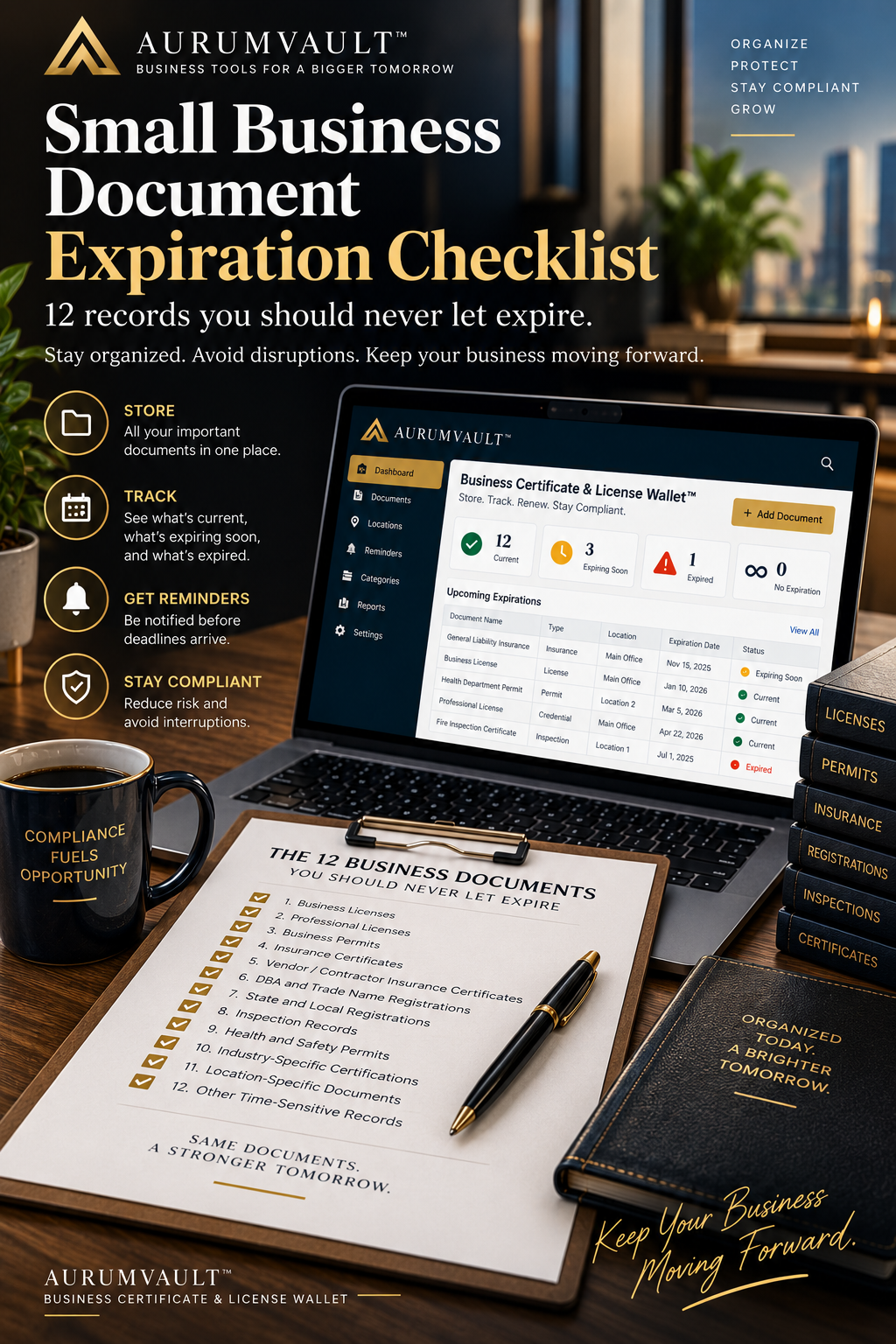
Small Business Document Expiration Checklist: 12 Records You Should Never Let Expire
Running a small business creates paperwork faster than many owners expect.
A business may have a state or local license, professional credentials, insurance certificates, permits, registrations, inspection records and other documents that need to remain current. Some renew annually. Others follow different schedules. Some may not expire at all but still need to be stored where they can be found quickly.
The problem is rarely obtaining the first document.
The problem is remembering what needs attention six months, a year or several years later.
That is why every growing company should maintain a business document expiration checklist.
A missed renewal can create unnecessary administrative work and, depending on the document and jurisdiction, may affect a company's ability to perform certain activities, satisfy contractual requirements or demonstrate that a credential is current.
Instead of relying on memory, scattered emails or a calendar reminder created months ago, businesses can build a repeatable system around three questions:
1. What documents do we have?
2. When does each document expire or require renewal?
3. Who is responsible for taking action before the deadline?
Here are 12 categories of business records worth reviewing.
1. Business Licenses
Start with the licenses that authorize or relate to your company's operations.
Depending on the business and location, these may include state, county, city or industry-specific licenses.
For each license, record at minimum:
- License name
- Issuing authority
- License or registration number
- Business or location covered
- Issue date
- Expiration or renewal date
- Responsible person
- Supporting document or file
Do not assume every license follows the same renewal cycle. A company operating in multiple locations may have several separate deadlines.
2. Professional Licenses
Professional credentials deserve their own category because they may belong to individual professionals rather than the company itself.
Examples can include licenses or credentials associated with regulated professions and specialized occupations.
A useful tracking record should identify both the credential and the person associated with it.
For organizations with several credentialed employees, this can quickly become a significant administrative responsibility.
3. Business Permits
Permits can be easy to overlook because businesses often think about them primarily when opening, relocating or beginning a new activity.
Your permit inventory might include operational permits, local permits or other authorizations applicable to the business.
The important question is not simply whether you obtained the permit.
Ask whether it remains current and whether any renewal, inspection or supporting documentation is required.
4. Insurance Certificates
Insurance documentation is frequently requested by landlords, clients, contractors, vendors and business partners.
A company may maintain evidence related to general liability, professional liability, workers' compensation, commercial auto, cyber insurance or other coverage appropriate to its operations.
When tracking insurance-related documents, capture the policy or certificate expiration date and begin reviewing renewal requirements before the final day.
The goal is to avoid discovering an expired document when someone asks you to produce current proof.
5. Certificates of Insurance From Vendors and Contractors
Your own insurance documents are not the only records worth tracking.
Depending on your operations and contractual relationships, your company may also maintain certificates of insurance supplied by contractors, subcontractors, service providers or other third parties.
If those records matter to your risk-management process or contractual requirements, their expiration dates should not disappear into an email inbox.
Record the provider, coverage document, expiration date and internal owner responsible for follow-up.
6. DBA and Assumed-Name Registrations
Businesses operating under a trade name, assumed name or DBA should keep the applicable registration records organized.
Requirements and renewal schedules vary by jurisdiction, so businesses should verify the rules that apply where they operate.
Your internal record can include:
- Registered name
- Legal entity
- Jurisdiction
- Registration date
- Renewal or expiration date, if applicable
- Filing confirmation
Even when a record has no immediate expiration date, keeping the documentation accessible can save time when banks, vendors or other parties request it.
7. State and Local Registrations
Businesses may accumulate registrations across multiple agencies and jurisdictions.
The complexity increases when a company expands into additional states, counties, cities or physical locations.
A multi-location business should avoid treating compliance records as one undifferentiated folder.
Associate each record with the appropriate location or entity so the team can determine exactly what a document covers.
8. Inspection Records and Certificates
Some businesses undergo recurring inspections or maintain certificates associated with facilities, equipment, health and safety requirements or other operational conditions.
These records may have different schedules from your ordinary business licenses.
Track the inspection date, certificate or report, location, next expected inspection or expiration date and responsible team member.
The objective is visibility: you should be able to see an approaching deadline before it becomes urgent.
9. Health and Safety Permits or Certificates
Businesses operating in industries involving food, facilities, public access or specialized activities may have health or safety-related documentation.
Because requirements vary widely by industry and jurisdiction, identify the records that specifically apply to your company rather than relying on a generic checklist alone.
Once identified, add them to the same expiration-management process as your other business records.
10. Industry-Specific Certifications and Credentials
Your company may rely on certifications or credentials specific to its industry.
These could be held by the business, a facility or an individual employee.
A useful tracking system should distinguish among them.
Record who or what the credential belongs to, the issuing organization, the current document, the renewal date and any internal owner responsible for maintaining it.
11. Registrations Connected to Specific Locations
Opening a second location can multiply document-management complexity.
A license for your main office may not necessarily represent every location or activity your company operates.
For every new location, create a location-specific document inventory.
Ask:
- Which licenses belong to this location?
- Which permits apply here?
- Which insurance documents are relevant?
- Which inspections or certificates need tracking?
- Which registrations have renewal dates?
This creates a much cleaner operating record than storing everything in a single folder without location information.
12. Other Time-Sensitive Business Credentials
Finally, create a category for important credentials that do not fit neatly into the previous groups.
Every business is different.
Your organization may have registrations, certificates, authorizations or contractual evidence that needs periodic renewal even though it is not commonly included on generic small-business checklists.
If losing, missing or allowing a document to lapse could disrupt operations, delay a transaction or create unnecessary work, it belongs in your tracking system.
Build a Business Document Expiration System
Knowing which documents matter is only the first step.
The larger objective is creating a repeatable process.
A simple system can follow five stages:
STORE → CATEGORIZE → TRACK → REMIND → RENEW
Step 1: Create One Document Inventory
Start by identifying the documents your company currently maintains.
Do not worry about building a perfect system immediately. First establish visibility.
For each document, capture:
- Document name
- Category
- Location
- Issuing organization
- Issue date
- Expiration date
- Owner
- Current status
- Digital copy or storage location
You may discover duplicate files, old versions or credentials that nobody has reviewed recently. That discovery is useful.
Step 2: Separate Current, Expiring and Expired Records
A document repository tells you what you have.
An expiration system tells you what needs attention.
Consider dividing records into four simple statuses:
Current
The document is active and not approaching the renewal window you have established.
Expiring Soon
The expiration date is approaching and action should begin.
Expired
The recorded expiration date has passed.
No Expiration
The document is important but does not have a known expiration date.
This makes a large document library easier to understand at a glance.
Step 3: Assign Locations
Location tracking becomes increasingly important as a business grows.
A company with one office may manage 20 documents easily. A company with five locations could eventually manage hundreds of individual records.
Connecting each document to the correct location helps answer an important question quickly:
Which credentials are current for this specific location?
Step 4: Create Multiple Renewal Reminders
A single reminder on the expiration date is often too late.
Instead, create a sequence of milestones based on how much preparation a renewal typically requires.
Possible reminder intervals include:
- 60 days before expiration
- 30 days before expiration
- 21 days before expiration
- 14 days before expiration
- 7 days before expiration
- 3 days before expiration
- 1 day before expiration
- Expiration day
Not every document needs every reminder.
The important principle is giving the responsible person enough time to act.
A simple renewal may need only a short lead time. A renewal requiring documentation, inspection, payment or third-party coordination may need significantly more.
Step 5: Preserve the Renewed Document
Do not stop tracking once a renewal is complete.
Replace or archive the old document appropriately, save the current version and record the new expiration date.
The renewal becomes the beginning of the next cycle.
Why Calendar Reminders Alone Can Become Difficult
A calendar can work when a business has only a handful of records.
But complexity grows quickly.
Imagine tracking 40 documents across several categories and locations. A calendar event might tell you that something expires, but it may not immediately show the document itself, its category, the location it belongs to or the broader status of your business records.
That is why a dedicated document wallet or expiration tracker can become useful.
The system connects the reminder to the record being managed.
A Better Small-Business Habit: Review Expirations Monthly
Even with automated reminders, establish a short monthly review.
Look at:
- Documents already expired
- Documents expiring in the next 30 to 60 days
- Newly added business locations
- New licenses or permits
- Renewed documents that need updated expiration dates
- Records with missing expiration information
This does not need to become a large compliance meeting.
For a small organization, it can simply become part of the monthly operations checklist.
From Spreadsheet to Business Certificate & License Wallet™
A spreadsheet can be an excellent place to begin.
But as the number of documents, locations and renewal dates grows, businesses may want a system specifically designed around document expiration tracking.
The Business Certificate & License Wallet™ from AurumVault is designed around that straightforward problem: store important business credentials in one place, see what is current, identify what is expiring soon and receive renewal reminders before deadlines are missed.
Businesses can organize documents such as licenses, permits, insurance certificates, registrations, credentials and inspection records while associating them with business locations.
The objective is simple:
Store the proof. See what's current. Get warned before anything expires.
For businesses with only a few records, the important thing is establishing the habit early. As the company grows, the same system can expand across additional documents and locations.
Business Document Expiration Checklist
Use this condensed checklist during your next document review:
- [ ] Business licenses
- [ ] Professional licenses
- [ ] Business permits
- [ ] Insurance certificates
- [ ] Vendor or contractor insurance certificates
- [ ] DBA or assumed-name registrations
- [ ] State and local registrations
- [ ] Inspection records and certificates
- [ ] Health and safety permits or certificates
- [ ] Industry-specific certifications
- [ ] Location-specific registrations and credentials
- [ ] Other time-sensitive business records
Then confirm that every applicable record has:
- [ ] A current digital copy
- [ ] The correct expiration or renewal date
- [ ] A document category
- [ ] The correct business location
- [ ] A responsible owner
- [ ] Advance renewal reminders
- [ ] A process for replacing the record after renewal
The Bottom Line
Business document management does not need to be complicated.
What creates problems is lack of visibility.
A license stored in an inbox is easy to forget. A permit sitting in a filing cabinet cannot remind you that it expires next month. An insurance certificate saved under an unclear filename may be difficult to find when a customer requests it.
A good business document expiration checklist turns those scattered records into a manageable operating system.
Know what you have.
Know where it belongs.
Know when it expires.
Know who needs to act.
And make renewal a process rather than an emergency.
Educational notice: This article provides general organizational and educational information only. Licensing, permitting, insurance, registration and renewal requirements vary by jurisdiction, industry and business activity. It is not legal, regulatory, insurance, tax or compliance advice. Businesses should verify applicable requirements with the appropriate government agency, insurer, licensing body or qualified professional.
Enjoying the Academy?
Join AurumVault Insider for new practical guides, digital tools, and marketplace releases.
No spam. Unsubscribe anytime. Privacy
By subscribing, you agree to receive AurumVault Insider emails. You can unsubscribe at any time.