
How to Use AI in a Small Business: Build a Real Operating System
AI can help small businesses work faster, but using random prompts without business context can create inconsistent results. This guide explains how to build a practical AI operating system around your business, workflows, rules, reviews, and human decisions.
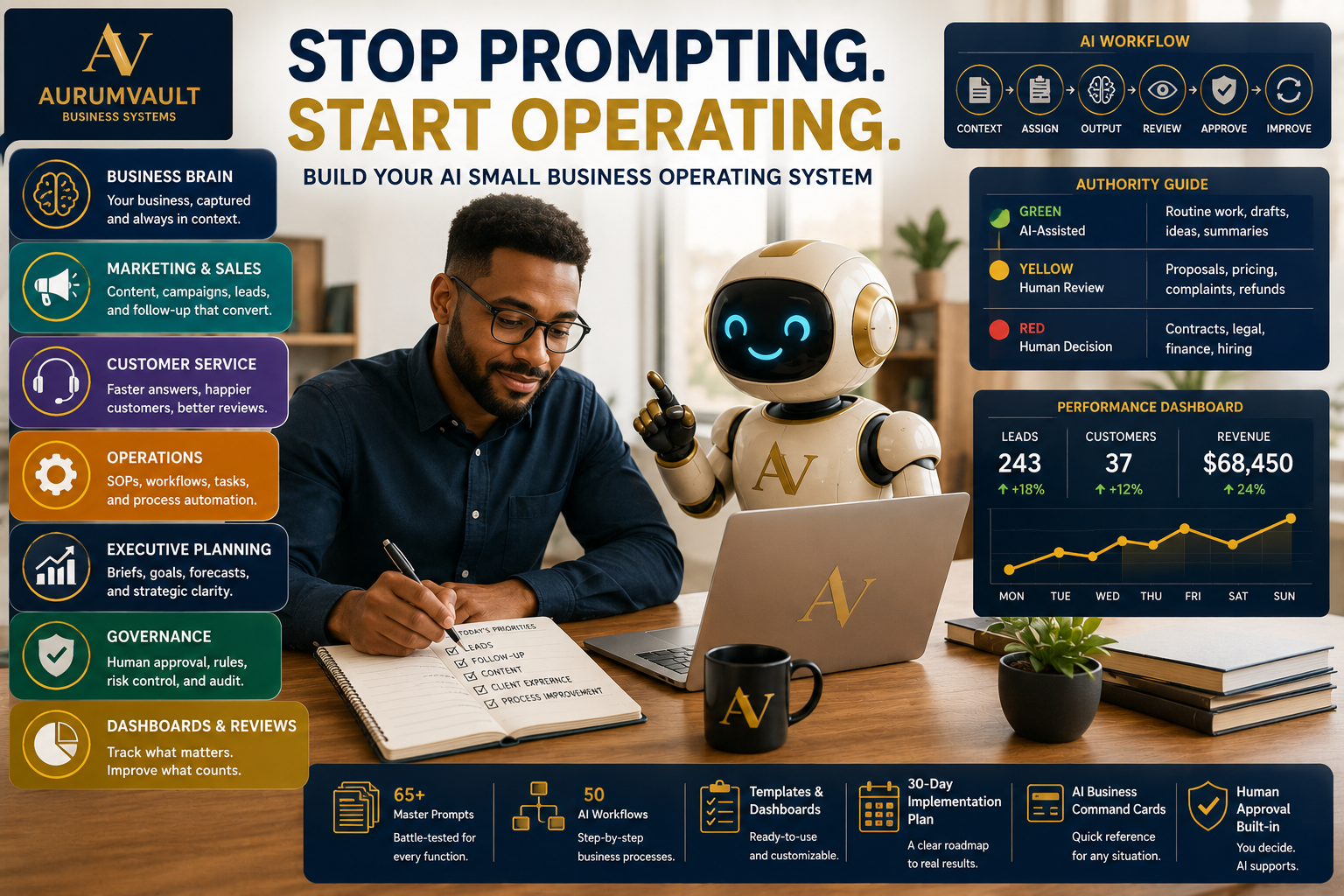
How to Use AI in a Small Business: Build a Real Operating System
Artificial intelligence can help a small business write faster, brainstorm ideas, summarize information, organize work, analyze options, and create first drafts.
But there is a major difference between using AI occasionally and actually building AI into the way a business operates.
Many business owners start with prompts.
They ask an AI tool to write a Facebook post, create an email, draft a proposal, answer a customer question, or generate a marketing plan.
The results may look impressive at first.
Then the problems begin.
The AI doesn't know the correct price.
It doesn't understand the brand voice.
It invents details about a service.
It produces a customer response that conflicts with policy.
It recommends an action nobody authorized.
The problem is not necessarily the AI tool.
The problem is that the AI was given a task without a business operating system around it.
What Is an AI Small Business Operating System?
An AI small business operating system is a structured framework for deciding:
- What business information AI should know
- What work AI can help perform
- Which workflows should be repeatable
- What requires human review
- What AI should never decide independently
- How outputs are checked
- How decisions are documented
- How the system improves over time
The objective is not maximum automation.
It is better execution.
A good system helps AI work with the context, rules, goals, and boundaries of the actual business instead of treating every request like an isolated prompt.
Step 1: Build a Business Brain Before You Build Prompts
One of the biggest mistakes businesses make with AI is beginning with a giant prompt library before documenting the business itself.
AI performs better when it has usable context.
Your Business Brain should capture information such as:
- What your business does
- What you sell
- Your prices
- Your ideal customer
- Your main customer problems
- Your value proposition
- Your brand voice
- Business goals
- Common objections
- Policies
- Approval requirements
- Important boundaries
Think of this as the business profile AI should reference before producing work.
Without this foundation, each prompt forces the AI to guess—or forces you to repeatedly explain the same information.
Step 2: Define What AI Is Allowed to Do
Not every business task should have the same level of AI authority.
Routine brainstorming is very different from approving a refund.
Drafting a social media caption is very different from signing a contract.
A practical authority model can separate work into three levels.
Green: Routine AI-Assisted Work
Examples may include:
- Brainstorming
- First drafts
- Summaries
- Checklists
- Content ideas
- Internal organization
These tasks may be relatively low risk when the AI has the right context.
Yellow: Human Review Required
Examples may include:
- Proposals
- Pricing recommendations
- Complaints
- Refund recommendations
- Public claims
- Vendor recommendations
- Important customer communications
AI can analyze or draft, but a person reviews the result before it is used.
Red: Human Decision Required
Examples may include:
- Contracts
- Legal matters
- Tax decisions
- Major financial commitments
- Employment actions
- Security incidents
- Sensitive customer matters
AI may help organize information, but accountability remains with a person.
The central principle is simple:
AI can assist with decisions without silently giving itself authority to make them.
Step 3: Use a Repeatable AI Workflow
A strong AI workflow can follow six stages:
1. Context
Give the AI the correct business information.
2. Assignment
Define the exact job that needs to be completed.
3. Output
Ask for a draft, analysis, plan, recommendation, or other defined deliverable.
4. Review
Check the result for accuracy, fit, tone, missing information, and risk.
5. Approve
A person decides whether important work is ready to use.
6. Improve
Save what worked, correct what failed, and improve the workflow for next time.
This turns AI from an occasional conversation into part of a repeatable process.
Step 4: Start With Marketing
Marketing is often one of the easiest places for a small business to begin using AI.
A structured marketing system can help define:
- Primary audience
- Main offer
- Marketing objective
- Main channels
- Calls to action
- Content pillars
- Publishing schedule
- Performance metrics
Instead of asking AI, 'Give me 30 social media posts,' provide the Business Brain and ask for a realistic marketing plan connected to the company's actual goals and offers.
For example, a 30-day content plan might specify:
- Topic
- Format
- Platform
- Hook
- Main message
- CTA
- Status
This creates something the business can actually execute.
Step 5: Build an AI-Assisted Sales System
AI can also help organize sales work when the process is clearly defined.
Useful sales workflows may include:
- Lead intake
- Lead qualification
- Follow-up
- Objection handling
- Proposal preparation
- Pipeline reviews
A simple pipeline might move through stages such as:
New → Qualified → Contacted → Proposal → Follow-Up → Won / Lost / Nurture
The important rule is that AI should not invent missing facts.
If the prospect never provided a budget, the AI should not create one.
If the business has no approved discount, the AI should not offer one.
If a deadline does not exist, the AI should not manufacture fake urgency.
Step 6: Improve Customer Service Without Losing Control
Customer service can benefit from AI, but it also requires clear boundaries.
A structured customer service system might classify inquiries as:
- General question
- Product or service question
- Order or project status
- Billing
- Complaint
- Refund
- Technical issue
- Review or feedback
- Urgent matter
- Escalation required
A complaint workflow might follow:
Understand → Acknowledge → Verify → Resolve → Escalate → Document
AI can help draft calm, professional responses, but it should not invent facts, admit legal liability, promise unauthorized compensation, or make decisions beyond its approved authority.
Step 7: Turn Repeated Work Into Operations
Small businesses often lose enormous amounts of time repeating the same process slightly differently every time.
This is where operating procedures and workflow maps become valuable.
A useful SOP can identify:
- Purpose
- Trigger
- Owner
- Required inputs
- Step-by-step procedure
- Quality checks
- Escalation conditions
- Completion criteria
You can also map a process as:
Trigger → Inputs → Actions → Decisions → Outputs → Follow-Up
Then review recurring work and classify it as:
- Keep manual
- AI-assisted
- Potentially automatable
Not every task should be automated.
The objective is to identify where AI genuinely reduces friction without introducing unnecessary risk.
Step 8: Use AI for Executive Planning
AI is not only useful for writing and customer-facing work.
It can also help owners think more clearly about the business itself.
A daily executive brief might include:
- Top three priorities
- Urgent issues
- Decisions needed
- Customer impact
- Opportunities
- Blocked work
- One thing that can wait
A weekly CEO review might examine:
- Wins
- Misses
- Key numbers
- Customer signals
- Operations
- Opportunities
- Risks
- Decisions
- Next-week priorities
AI can organize these inputs and analyze options without replacing the owner's judgment.
Step 9: Add Governance Before You Add More Automation
As AI becomes more integrated into the business, controls become more important—not less.
Governance should address areas such as:
- Authority boundaries
- Approval requirements
- Sensitive information
- Fact checking
- Escalation
- Error handling
- Decision logging
- Quality review
AI should not silently increase its own authority.
If a task crosses an approved boundary, the proper action is to stop and request review.
Sensitive information should also be limited to what is actually necessary for the task. Passwords, authentication keys, payment-card information, private financial records, and other sensitive data require appropriate protection.
Step 10: Use a Quality Gate Before Business Use
AI-generated work should not automatically become business-approved work.
Before an important output is used, ask:
Accuracy
Are the facts, names, prices, and dates correct?
Context
Does the work actually fit this business?
Voice
Does it sound like the company?
Risk
Could it create legal, financial, customer, privacy, or reputational problems?
Authority
Does this action require human approval?
And finally:
Would you put your name or business behind this output?
If the answer is no, it is not ready.
Step 11: Track What Works
An AI operating system should improve over time.
Track:
- Effective prompts
- Failed outputs
- Common errors
- Workflow bottlenecks
- Customer complaints
- Missed follow-ups
- Decisions
- Exceptions
- Risks
- Useful automations
- Time savings
The purpose of tracking is not bureaucracy.
It is learning.
A business that records what works can gradually build a stronger internal operating system rather than starting from zero every time.
Step 12: Implement AI in 30 Days Instead of Trying Everything at Once
Trying to transform the entire business in one weekend is usually unnecessary.
A more practical rollout might look like this:
Week 1: Foundation
Build the Business Brain, business rules, authority boundaries, and master context.
Week 2: Revenue
Set up marketing, content, sales pipeline, and follow-up workflows.
Week 3: Experience and Operations
Create an FAQ, complaint workflow, first SOP, and workflow map.
Week 4: Leadership and Control
Create an executive dashboard, decision log, risk register, approval matrix, and governance review.
Start small.
Build one useful workflow.
Review it.
Improve it.
Then expand.
Prompt Pack vs. AI Operating System
A prompt pack gives you instructions to paste into an AI tool.
That can be useful.
But a business operating system goes further.
It connects prompts with:
- Business context
- Workflows
- Templates
- Dashboards
- Reviews
- Approval rules
- Decision records
- Risk controls
- Implementation steps
The question changes from:
'What should I ask AI?'
To:
'How should this business use AI responsibly and repeatedly to get better work done?'
That is a much more valuable question.
The Goal Is Not Maximum Automation
The most advanced AI strategy is not necessarily the one with the most automated tasks.
A small business still needs judgment, accountability, customer understanding, strategy, and ownership.
AI can assist with work.
It can organize information.
It can draft.
It can analyze.
It can help identify patterns.
But people remain responsible for consequential decisions.
That is what turns AI from a novelty into an operating advantage.
Build Your Own AI Small Business Operating System
For business owners who want a structured way to implement these ideas, The AI Small Business Operating System by AurumVault Business Systems is designed as a complete working framework rather than a standalone collection of prompts.
It includes a Core Operating System, Business Brain framework, Master Prompt Vault, templates and dashboards, AI Business Command Cards, a 30-Day Implementation Plan, and 50 AI-assisted business workflows.
The system covers marketing, sales, customer service, operations, executive planning, governance, human approval, reviews, and ongoing improvement.
Its central philosophy is simple:
Stop prompting. Start operating.
Because the real opportunity is not asking AI more questions.
It is building a business that knows how to use AI well.
Enjoying the Academy?
Join AurumVault Insider for new practical guides, digital tools, and marketplace releases.
No spam. Unsubscribe anytime. Privacy
By subscribing, you agree to receive AurumVault Insider emails. You can unsubscribe at any time.
Continue your journey
Keep reading
EU Packaging Compliance 2026: PPWR Checklist for Small Brands and Ecommerce
EU packaging compliance can involve far more than choosing recyclable packaging. Small brands selling into European markets may need to understand their economic role, map packaging components, collect supplier evidence, document material data, review recyclability and labeling, track country-level EPR actions and maintain technical records. This guide provides an evidence-first framework for organizing that work.
AI Governance for Small Business: The Complete 2026 Checklist
Small businesses are adopting AI faster than many are creating rules for it. This practical 2026 checklist shows business owners how to inventory AI tools, protect sensitive information, define employee and AI-agent authority, require human approval for consequential actions, evaluate vendors, document incidents and create a manageable AI governance system.
AI Governance in Banking: A Practical Operations Framework
Banking AI governance should go beyond documenting models. This practical framework shows how financial institutions can inventory AI use, classify customer and financial impact, establish authority limits, validate material systems, preserve transaction-level evidence and review complaints, incidents and controls.